
 By
By 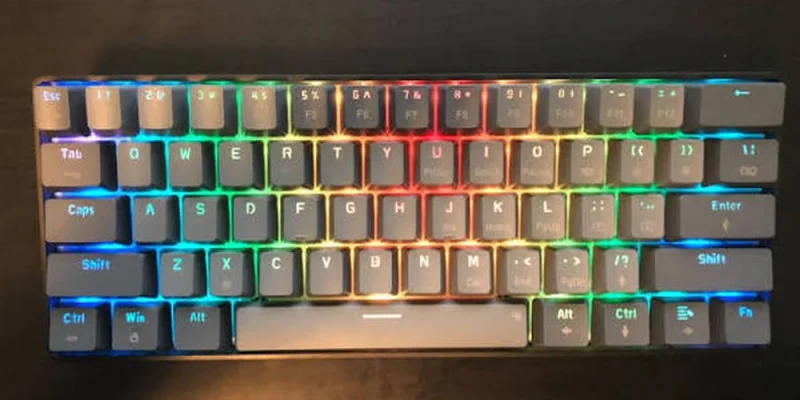
Mechanical keyboards have become smaller in recent years, with 75%, 65%, and even more compact layouts attracting users who want extra mouse space or a minimalist desk. Yet compactness is not automatically better for every workflow. The SABLUTE Wireless Mechanical Keyboard and Mouse Combo makes the opposite case by retaining a traditional 104-key format while adding mechanical switches and a more distinctive retro design. It includes a dedicated numeric keypad, function row, arrow keys, navigation keys, multimedia controls, a calculator shortcut, and a multifunction knob. For users whose work includes spreadsheets, data entry, document navigation, or frequent shortcuts, that complete layout can be more useful than saving a modest amount of desk space. This review looks at SABLUTE mainly as a productivity keyboard, while also considering its wireless connection, battery, lighting, and bundled mouse.
A 104-key footprint built around access rather than minimalism
The SABLUTE keyboard makes its strongest visual statement through its round typewriter-style keycaps. They are ABS keycaps with decorative electroplated rings, arranged across a full 104-key keyboard and paired with a metal top panel. The effect is deliberately modern-retro: the board references the visual character of a vintage typewriter while keeping the functions expected from a contemporary desktop keyboard. That balance is important to the product’s positioning. This is not being presented as a high-end custom mechanical keyboard with enthusiast construction claims. Instead, the appeal is simpler and more mainstream: a keyboard that looks more interesting than a generic office board while still providing a full number pad, function row, arrow keys, and navigation controls. For aesthetic home offices, student desks, and creative workspaces, that formula is easy to understand.
Linear red switches keep the larger board feeling easy to type on
Typing is handled by linear red mechanical switches. The supplied specifications describe a smooth, relatively light keystroke without a tactile bump, which makes the switch style approachable for people coming from ordinary office keyboards or trying a mechanical keyboard for the first time. The switch lifespan is listed at approximately 50 million keystrokes. That does not turn the SABLUTE into an enthusiast-grade mechanical keyboard, and it should not be marketed that way. The more accurate positioning is an accessible mechanical typing experience for everyday work, study, writing, and general computer use. Linear switches also create a simple, predictable key feel because the press is not interrupted by a tactile bump. Users who specifically want a clicky or strongly tactile response should note that this product is not designed around that sensation. Its mechanical appeal is centered on smoothness, familiarity, and everyday usability rather than specialist tuning or custom-keyboard features.
The numpad, function row and navigation cluster in real workflows
Full-size keyboards remain useful for a simple reason: every major key group is available immediately. SABLUTE’s 104-key layout retains the numeric keypad, function row, arrows, navigation keys, multimedia functions, and a dedicated calculator shortcut. That is particularly relevant for users who work with spreadsheets, accounting-style number entry, office software, or any task where repeated access to numbers and navigation keys matters. The multifunction control knob adds another layer of convenience by handling common adjustments without replacing the conventional key groups. Rather than chasing compactness, this keyboard prioritizes completeness. It is therefore better suited to a desk where the keyboard can stay in place than to a minimalist travel setup. For home offices and study areas, however, the larger format can make daily work more direct because familiar controls are exactly where most users expect them to be. That is also why it makes sense for buyers searching for a mechanical keyboard for office work, where direct access to numbers and navigation keys can matter more than saving a few inches of desk space.
Wireless freedom without giving up a wired fallback
For most desktop users, connectivity needs to be dependable more than complicated, and SABLUTE follows that idea. A single 2.4GHz USB receiver connects both devices in the set, meaning the mouse does not require its own separate dongle. A single 2.4GHz USB receiver connects both the keyboard and mouse from up to 26 ft (8 m) under suitable conditions. The keyboard also includes USB-C wired functionality and can be used while it charges, which is useful if power runs low during the day. The main purchasing consideration is Bluetooth: there is none. Users should not expect tablet-style Bluetooth pairing, multi-device Bluetooth switching, or a three-mode connection system. Instead, the combo is built around a conventional USB receiver for wireless use and a USB-C cable for the keyboard. For a home office or fixed desk, that can be refreshingly uncomplicated.
Lighting choices across a wider full-size surface
SABLUTE gives the keyboard more lighting flexibility than a basic single-color office board, but it keeps the system accessible. There are 17 backlighting effects, seven selectable single colors, extra RGB effects, and up to 108 combinations according to the supplied specifications. Lighting controls live on the keyboard itself, with the multifunction knob providing convenient access to backlight settings and brightness. That is useful for users who want immediate adjustments without opening an application. The correct description, however, is customizable backlighting rather than per-key RGB. There is no stated support for individually addressable keys or software-based RGB control. The feature is best appreciated as a built-in visual layer that complements the retro keycaps and can be changed or turned off depending on the room, time of day, or preferred desk style.
The knob adds another shortcut without sacrificing dedicated keys
SABLUTE’s multifunction knob gives users a tactile shortcut for two frequently changed settings. In its audio role, the knob changes volume with a turn and toggles mute with a press. In its lighting role, it helps adjust backlight settings and brightness. The implementation is intentionally simple and does not depend on software. That fits the product’s mainstream focus: everyday controls should remain accessible directly from the hardware. The knob is not the headline feature, but together with the full-size layout it contributes to a keyboard that is clearly designed to stay on a primary work desk.
A large battery for a keyboard designed to stay on the desk
Power comes from a built-in 5000mAh rechargeable battery, charged through USB-C. The keyboard can continue to be used while it is charging, which reduces the practical downside of a depleted battery. SABLUTE also includes automatic power-saving behavior: the backlight turns off after roughly two minutes of inactivity, and the keyboard enters sleep mode after about ten minutes. Pressing a key wakes it again. With the backlight turned off, the supplied estimate reaches up to approximately 1,000 hours of use, though actual battery life varies with lighting, typing frequency, wireless conditions, and other factors. That caveat is important because no single battery-life number can describe every real-world setup. The larger point is that SABLUTE combines a sizable rechargeable battery with power management designed for everyday wireless use, while preserving wired operation whenever charging is necessary.
Full-size productivity on Windows with usable Mac support
The keyboard includes a dedicated Mac mode with switchable Windows and Mac key mapping. In Mac mode, the bottom-row modifier keys are remapped to the familiar Control, Option and Command arrangement, while the function row provides macOS-oriented system, media and productivity shortcuts. The Mac function row is designed for macOS but is not identical to the standard Apple function row: F10-F12 are assigned to Copy, Paste and Select All rather than Apple’s usual audio controls. The dedicated calculator key is not available on macOS.
Why pairing the keyboard with a six-button mouse makes sense
The combo packaging means buyers do not have to treat the mouse as an afterthought. SABLUTE supplies a six-button wireless mouse that shares the keyboard’s 2.4GHz USB receiver. It includes forward and back side buttons and four DPI selections – 800, 1200, 1600, and 2400 – so users can adjust pointer speed for different preferences. The left and right clicks are designed to be quiet. That makes the mouse suitable for ordinary office work, browsing, and study use, while its matching design helps keep the workstation visually coordinated. The keyboard is still the more distinctive product, but the mouse adds practical value to the package.
Compact keyboards save space; this one saves keystrokes
The number pad is the obvious headline for spreadsheet users, but the broader advantage of a full-size board is direct access. Home, End, Page Up, Page Down, Insert, Delete, function keys, arrows, and numeric entry all have their own physical locations. A compact keyboard can reproduce many of those commands, but often through layers or combinations. That may be acceptable for users who prioritize a small footprint, yet it can become tedious in repetitive office workflows. SABLUTE’s approach is to keep the conventional layout and make it more appealing through mechanical red switches, round keycaps, and backlighting. The dedicated calculator shortcut reinforces the office orientation, while the control knob adds faster volume handling during calls or multimedia use. This is a board for users who want everything available at once. The trade-off is desk space, but for a fixed workstation the completeness may be worth more than compactness.
The trade-offs that come with this productivity-first design
A balanced review also needs to be explicit about the features that are not part of this product. The keyboard does not support Bluetooth and should not be described as tri-mode. The supplied specifications do not include hot-swappable switches, a gasket mount, PBT keycaps, per-key or individually addressable RGB, software-controlled RGB, Hall Effect or magnetic switches, Rapid Trigger, adjustable actuation, ultra-low-latency gaming claims. It is also not positioned as a professional gaming, premium enthusiast, custom, silent, or ergonomic keyboard. These are not small wording details: they define the category in which the SABLUTE combo should be judged. Buyers who require one of those specialist features should choose a product designed specifically around that need. Buyers who do not need them can focus instead on the SABLUTE’s actual strengths: full-size productivity, accessible mechanical switches, distinctive styling, simple wireless setup, rechargeable power, onboard lighting, and the convenience of a matching mouse.
For users who still want every key within immediate reach
For a productivity-first buyer, the SABLUTE combo succeeds or fails on a simple preference: do you still use the keys that compact boards remove? If the answer is yes, the 104-key layout is a meaningful advantage. It combines direct access to the numpad and navigation cluster with a mechanical switch feel and a more expressive design than a typical office keyboard. The 2.4GHz receiver, USB-C wired option, and included mouse make the setup practical for a primary desktop. Users who want the smallest possible keyboard should obviously look elsewhere, but users who consider the number pad and dedicated navigation keys essential will find that SABLUTE preserves those tools without sacrificing the modern features expected from a wireless mechanical board.
Users who still depend on a number pad and dedicated navigation keys may find a full size mechanical keyboard like this more practical than the compact layouts that dominate many current desk setups.










Comments